Your Business Central data is current. Your ops decisions are 2 days late.
The data exists. The reports run. The people are there.
A purchase order sits in an inbox until someone happens to look. Nothing broke. No system failed. A decision is simply waiting.
Copilot answers questions. OpsGrid decides and acts.
Decision latency costs $800K–$2.4M per year for a $50M operation: missed OTIF, emergency freight, excess inventory, manual coordination. OpsGrid closes it. What's your number? →
Modelled from: OTIF penalties (1–3% revenue), emergency freight (3–5× standard rate), excess inventory carrying cost, and manual coordination overhead. Baseline: $50M annual revenue, 2–3 day average operational decision cycle. Source: live Business Central deployments, 2023–2025.
OpsGrid is decision infrastructure for mid-market manufacturers, distributors, and logistics operators on Dynamics 365 Business Central. Governed decision agents monitor ERP signals continuously, surface ranked operational risks to named owners, and execute approved actions inside Microsoft Teams. Nothing posts to Business Central without explicit approval. An architectural constraint, not a policy setting.
2.3 days → 1.2 hours
in first 90 days
human approval
From one active OpsGrid beta deployment · Dynamics 365 Business Central · mid-market manufacturer · baseline captured at project start, outcomes at 30 and 90 days.
Forrester's AEGIS security framework independently names this same architecture "least agency": constrain what an agent can decide, not just what it can access. OpsGrid built the constraint first. Source
A $200 order and a $200,000 order need the same three signatures.
Approval chains get designed once, usually around the largest purchase anyone could imagine making. Then nobody re-scopes them by value. Put no response clock on any single step and a requisition sits in an inbox until its approver happens to look.
This is the failure mode with no alert attached. Nothing broke. No integration went down. No report flags a decision that hasn't been made yet, which is why approval latency stays invisible until someone measures it on purpose.
VP Operations and plant heads approve day to day and absorb the chase. Production schedules and customer commitments move behind whatever is still sitting unsigned.
Late POs land in the CFO's working capital, audit trail, and board pack. OpsGrid escalates the longest-overdue approvals to both roles at once.
Payhawk's 2026 CFO outlook names the same thing: "the hidden tax isn't only higher rates; it's decision lag". Their argument is that getting the numbers right stopped being the hard part, and the risk moved to how long it takes to act on them (Georgi Ivanov, Payhawk, December 2025). See where OpsGrid catches this →
"We were spending two to three days chasing down decisions that should have been made in the morning. The first week on OpsGrid, three of those decisions arrived in Teams before I had my coffee."
76% of organisations that embed AI into a formal decision governance model report 25%+ operational improvement (Hackett Group, 2026 Supply Chain Key Issues Study). "Not every AI system should be allowed to operate near physical or financial consequence. The closer AI gets to execution, the greater the need for context, governance, and human oversight." (ARC Advisory Group, Supply Chain Decision Intelligence, 2026). OpsGrid's approval-before-write architecture was built for exactly this constraint.
Read: Decision Infrastructure vs. Decision Intelligence (what makes them different) →Beyond the Pilot: Why OpsGrid Is Designed Differently
Most AI initiatives fail because they begin as experiments.
OpsGrid enters as production infrastructure: named decision owners, approval gates, audit trails. Not a pilot. Not a proof-of-concept. Inventory risk, dead stock, overdue POs, supplier follow-up: production-grade operational signals from day one.
Most operations teams running AI pilots find that insights surface but decisions still happen in meetings and email. The problem is governance: no named decision owner, no trigger, no approval trail, no audit. OpsGrid is the governance layer: every ranked decision has an owner, every approval has an audit trail, every recommendation is grounded in live Business Central data. That is why OpsGrid is production infrastructure, not another pilot.
Signal. Route. Approve. Execute. Audit.
The questions your ops team currently waits 2 days to answer. OpsGrid surfaces them from live BC data, routes the right action to the right person, and executes with your approval.
- Every signal ranked by cost impact, highest-risk decisions surface first in Microsoft Teams
- Ask anything in plain English: order status, vendor performance, overdue receivables, answered from live BC data in seconds
- Powered by AskOps: IntelliConnectQ's conversational ERP interface, built into OpsGrid for Business Central
- When a reorder threshold is crossed, OpsGrid fires a Teams card. One confirmation creates the Draft PO. Nothing posts to BC without your sign-off.
- Nothing posts to BC without explicit human approval. An architectural constraint, not a policy setting.
- Every action logged to an audit channel: who saw it, who decided, what they chose
- Full routing rules, SLA escalation, and decision learning are in development.
- OpsGrid lives where your team already operates. No new dashboards, no new logins.
- Designed specifically for Dynamics 365 Business Central.
- 3-week deployment. ROI in 60 days or 50% refund.
24 decisions OpsGrid surfaces. 17 live today, 7 in development.
Grouped by how much the delay costs, from a decision sitting unmade to a plain lookup. Live means it's running in the beta right now. Roadmap means it isn't, yet.
Showing 24 of 24 decision signals
-
Full breakdown LiveEvery requisition gets a response clock per approval step. Miss it and OpsGrid escalates straight to the approver's manager and the CFO: a Teams card with a name on it, not a report.
-
LiveOpsGrid stages a Draft PO the moment the threshold crosses and pings the owner in Teams. One click releases it in BC. This is the only fully closed loop on the page: Signal → Route → Approve → Execute → Audit, with nothing skipped.
-
Full breakdown LiveNot "stock is low." A dollar figure and days-of-cover per item, so the person deciding knows what's actually at stake before they act.
-
Full breakdown LiveA vendor committed to a date. The date passed. OpsGrid surfaces it the day it happens, not at the next ops review.
- Live
- Live
- Live
- Live
- Live
- Live
- Live
- Live
- Live
- Live
- Live
- Live
- LiveNot a decision in itself. The delivery wrapper for everything ranked above it, with duplicate suppression so it doesn't turn into noise.
- Is spend approaching or breaching a G/L budget?Full breakdownRoadmap
- Which vendors have outstanding quality holds?Roadmap
- Which open sales orders are at risk of an OTIF breach?Roadmap
- What is our current order fulfilment rate?Roadmap
- Which customer orders are pending beyond SLA?Roadmap
- Which items have backorders with no supply in sight?Full breakdownRoadmap
- What is the value of shipments delayed this week?Roadmap
Dynamics 365 Business Central required · Active Beta · 3-week deployment · ROI in 60 days or 50% refund
Estimate your annual decision latency cost
Based on IntelliConnectQ analysis across mid-market BC deployments: decision latency costs $800K–$2.4M annually for a $50M company. Scale by your revenue and average response time.
The decision-routing architecture behind OpsGrid is already running in production, as AskOps, a live deployment for a mid-market manufacturer on a custom ERP. OpsGrid brings that same architecture to Dynamics 365 Business Central as a productized platform.
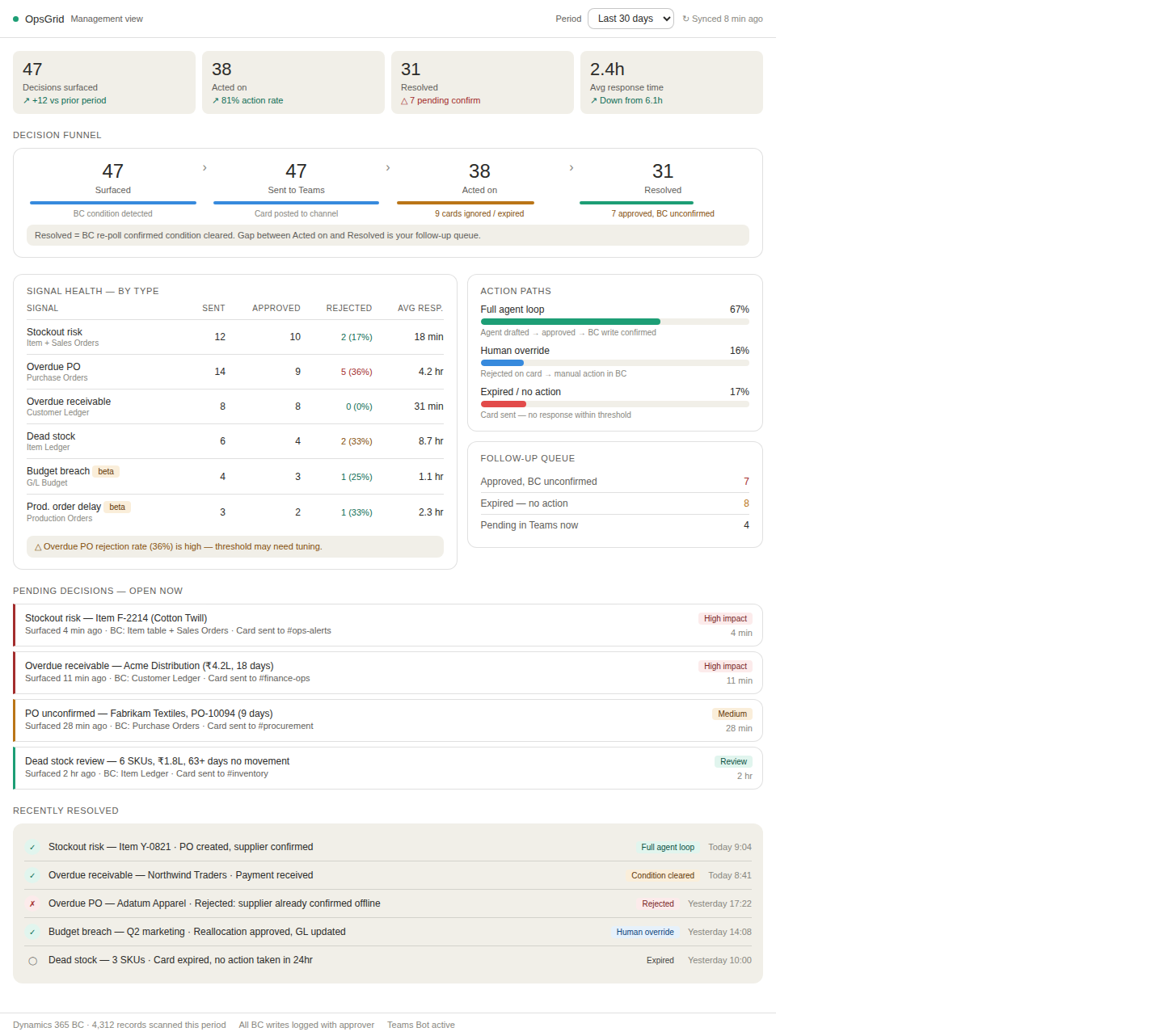
The weekly ops review your team doesn't have to build.
Teams handles real-time decisions. This view gives your ops reviewer everything else: what was surfaced, who acted, what resolved, and what still needs follow-up. Built from live BC data. No export, no pivot table, no meeting to prepare for it.
Your team is chasing answers Business Central already has. OpsGrid surfaces them to the right person before the problem costs you.
Read-only BC access. No external data store. Human approval before any write. Full architecture, permission model, and self-hosted LLM option.
3-week deployment. Measurable ROI in 60 days or 50% back. What decision latency costs a $50M operation, and when OpsGrid pays for itself.
Production delays and cost variances that surface in BC Tuesday and reach the plant head Friday. OpsGrid closes that gap.
OpsGrid for manufacturing →Credit holds, backorder SLAs, and stockout risk that stall in BC for days without a named owner.
OpsGrid for distribution →Delivery exceptions and invoice disputes scattered across five systems. Zero decisions moving until someone owns them.
OpsGrid for logistics →LangGraph engine, BC APIs, MS Teams Chat Framework. What OpsGrid reads, and what it never writes without approval.
View the architecture →You spent millions on Business Central. Make it actually run the business.
BC is the system of record for thousands of mid-market manufacturers, distributors, and operators: the data and the reports already exist. Decisions still happen in spreadsheets and the weekly ops call because getting the right view in front of the right person still takes days, not hours. OpsGrid closes that gap: the first decision infrastructure platform engineered specifically for Dynamics 365 Business Central's schema, permission model, and workflows.
OpsGrid is a decision infrastructure layer for Dynamics 365 Business Central, in active beta with mid-market manufacturers, distributors, and logistics operators; other ERPs are on the roadmap.
OpsGrid monitors Business Central for operational signals and surfaces ranked recommendations into Microsoft Teams as actionable cards, with human approval required before any write to BC.
Manufacturers, distributors, and logistics operators on Dynamics 365 Business Central, typically 100–3,000 employees with a dedicated operations function.
Why not build this with Power Platform?
It comes up in almost every evaluation. Here is the honest answer.
- 6–18 months to build and test equivalent logic
- Per-user licensing adds up fast at scale
- Internal IT owns the maintenance burden
- Decision ownership and audit trail require custom builds
- No operational signal library: you define every threshold
- Live in 3 weeks against your BC environment
- No per-seat fees: one implementation fee, one monthly access fee
- We maintain the platform; you maintain the decision rules
- Decision ownership and audit trail built into the architecture
- BC-specific signal library: inventory, purchasing, production, sales
Power Platform is the right answer if you have a dedicated Power Apps team, internal maintenance capacity, and 12+ months before you need ROI. OpsGrid is the right answer if you need the outcome now.
The ops lead is out. The factory still knows what to do.
Most manufacturing operations run on one person's institutional knowledge. Which supplier was blocked and why. What the Thursday escalation path means. Who to call when BC shows a cost variance that doesn't match what actually happened on the floor. When that person is out (on leave, sick, or departed), the knowledge gap is immediate.
OpsGrid's decision log isn't a compliance artifact. Every signal, routing, approval, override, and outcome is recorded: who saw it, who decided, what they chose, what executed in BC. That record is institutional memory your operation owns permanently. It assembles itself in the course of normal operations.
What teams ask before applying for beta access.
Apply for OpsGrid Beta Access.
We review every application personally. You'll hear back within 48 hours. Entry starts with a free Decision Latency Audit: we map where your BC data is getting stuck and quantify the cost before you commit to anything.
- Dynamics 365 Business Central required
- 3-week deployment · ROI in 60 days or 50% refund
- No unsolicited sales calls. Your answers are read by a human.
Prefer a call first? Book a live demo →
See OpsGrid running on your BC environment.
OpsGrid is in active beta with manufacturing, distribution, and logistics operators on Dynamics 365 Business Central. We start with a free Decision Latency Audit, mapping exactly where your BC data is getting stuck and what it's costing you. No slides. Just a number.
Apply for beta access →Not ready for a demo? Tell us your biggest constraint:
We'll send the workflow most relevant to you. No calendar, no pitch.
Thinking on decision infrastructure, AI in operations, and Dynamics 365 BC, from the IntelliConnectQ team.