OpsGrid · Inventory workflow · Business Central

Your BC data shows the stockout risk. Nobody's routing it to anyone who can act.

The data exists in Business Central. Stockout risk, dead stock, frozen cash — it's all there. The problem is that none of it has a named owner. None of it has an approval path. None of it executes without a meeting.

Decision Infrastructure

Not a report. A system with an output.

OpsGrid routes inventory signals to named owners in Teams, captures their approval, and executes the action in Business Central — with a full audit trail. Every step governed.

Signal
BC data crosses a threshold — items at stockout risk, dead stock building, safety stock breached. OpsGrid detects it.
Route
The signal goes to a predefined owner — not a group inbox. One person. One responsibility. SLA clock starts.
Approve
Owner acts in Teams. One click — approve, reject, or escalate. No new app. No BC login required.
Execute
Approved action writes to Business Central — draft reorder, transfer order, or hold. Nothing executes without explicit human approval.
Audit
Who decided. When. What they chose. Every BC write logged. A defensible record assembled automatically.
Act from Microsoft Teams Predefined ownership — no ambiguity $0 unauthorized BC writes Full audit trail, automatic
The cost of slow inventory decisions

A $50M operation carries $200K–$400K per year in preventable inventory loss — stockout-driven lost sales, emergency freight on late reorders, and working capital locked in dead stock that hasn't moved in 60+ days. The data to prevent all of it is already in Business Central.

What OpsGrid surfaces

Five inventory signals. Live from your Business Central data.

These are the questions your ops team currently waits two days to answer. OpsGrid surfaces them automatically, ranked by revenue impact.

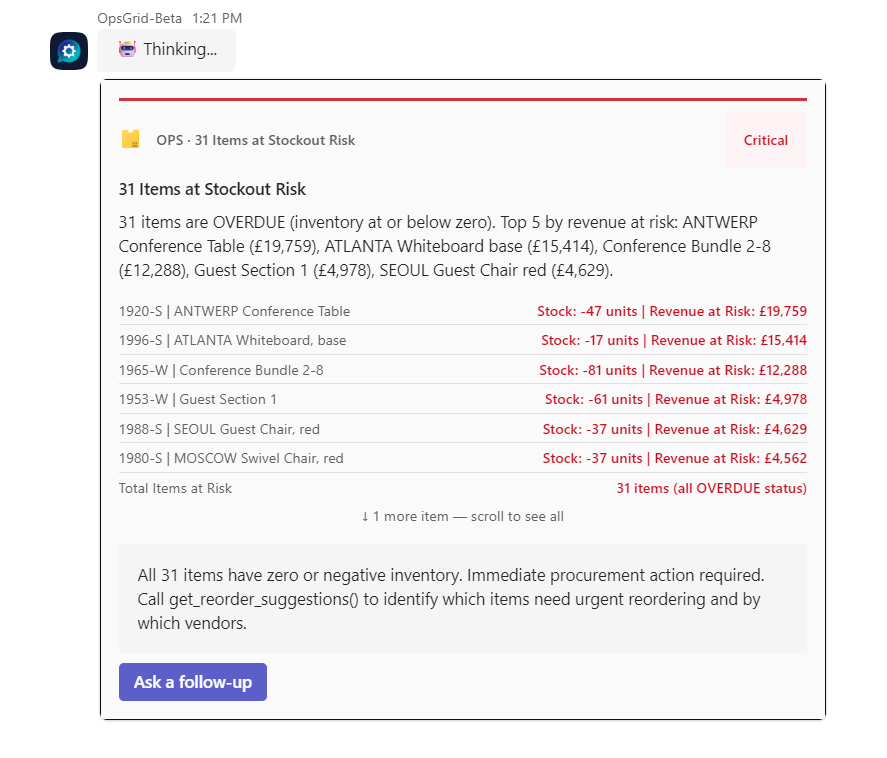
  • Items at stockout risk Ranked by revenue exposed — highest-risk items surface first, with days of cover and open orders factored in
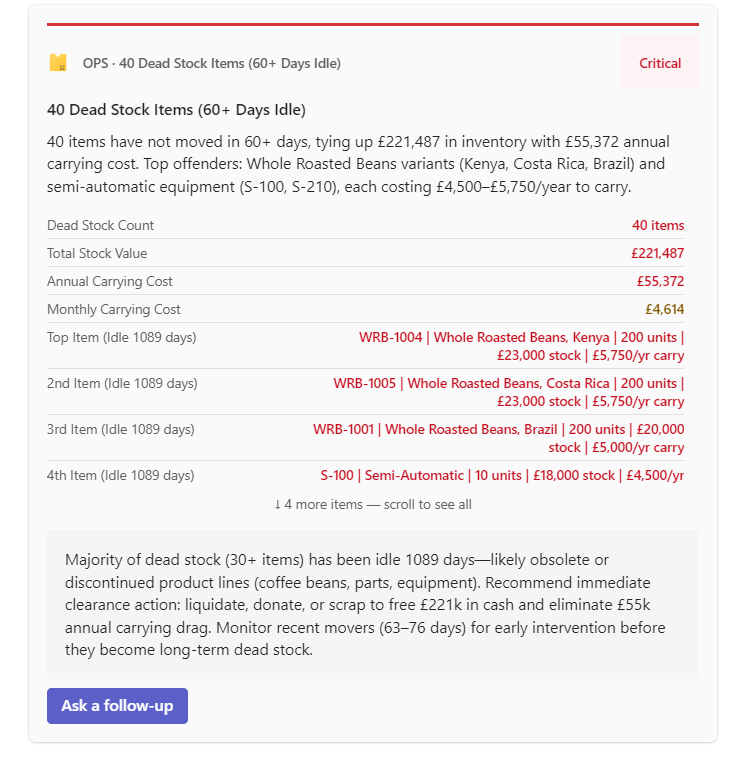
  • Dead stock — 60+ days, no movement Every item that hasn't moved, with last transaction date and current carrying cost
  • Cash frozen in inventory with no forecasted demand Working capital your operation is holding unnecessarily — by location, by item, by cost
  • Transfer suggestions between locations Where you're overstocked in one location and understocked in another — OpsGrid drafts the transfer order
  • Items below safety stock with lead time factored Reorder triggers that account for supplier lead time — not just current stock levels
OpsGrid inventory signal — live from Business Central
31 Items at Stockout Risk 40 Dead Stock Items 60+ Days

OpsGrid Beta · Dynamics 365 Business Central · sample data

How it works

From signal to decision in Teams. Without leaving BC.
OpsGrid monitors your Business Central inventory data continuously. No scheduled reports. No manual queries. Every item, every location, every threshold — watched in real time.
When a signal crosses a threshold, a ranked card fires in Microsoft Teams to the named decision owner. Revenue impact shown. Days of cover shown. Recommended action attached.
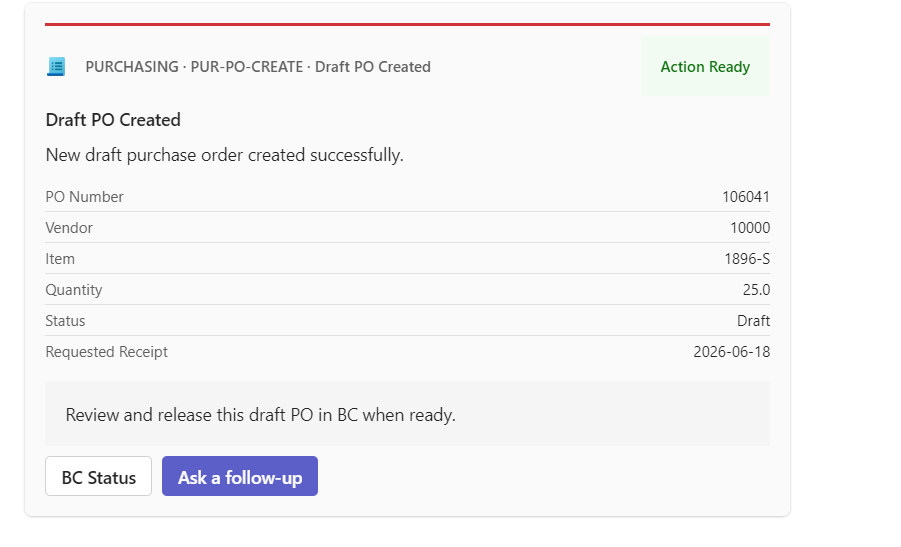
One-click approval. OpsGrid creates the draft reorder or transfer directly in BC. Nothing posts without your confirmation. Every decision logged to an audit trail.
OpsGrid inventory workflow — approved action executing in Business Central
Draft PO Created in BC 31 Items at Stockout Risk

OpsGrid Beta · Dynamics 365 Business Central · sample data

Management view

The decision funnel, signal health, and full audit trail.

Every inventory decision that ran through OpsGrid — who owned it, when it was acted on, what happened. A defensible record of how your operation handled stock risk. No export, no pivot table.
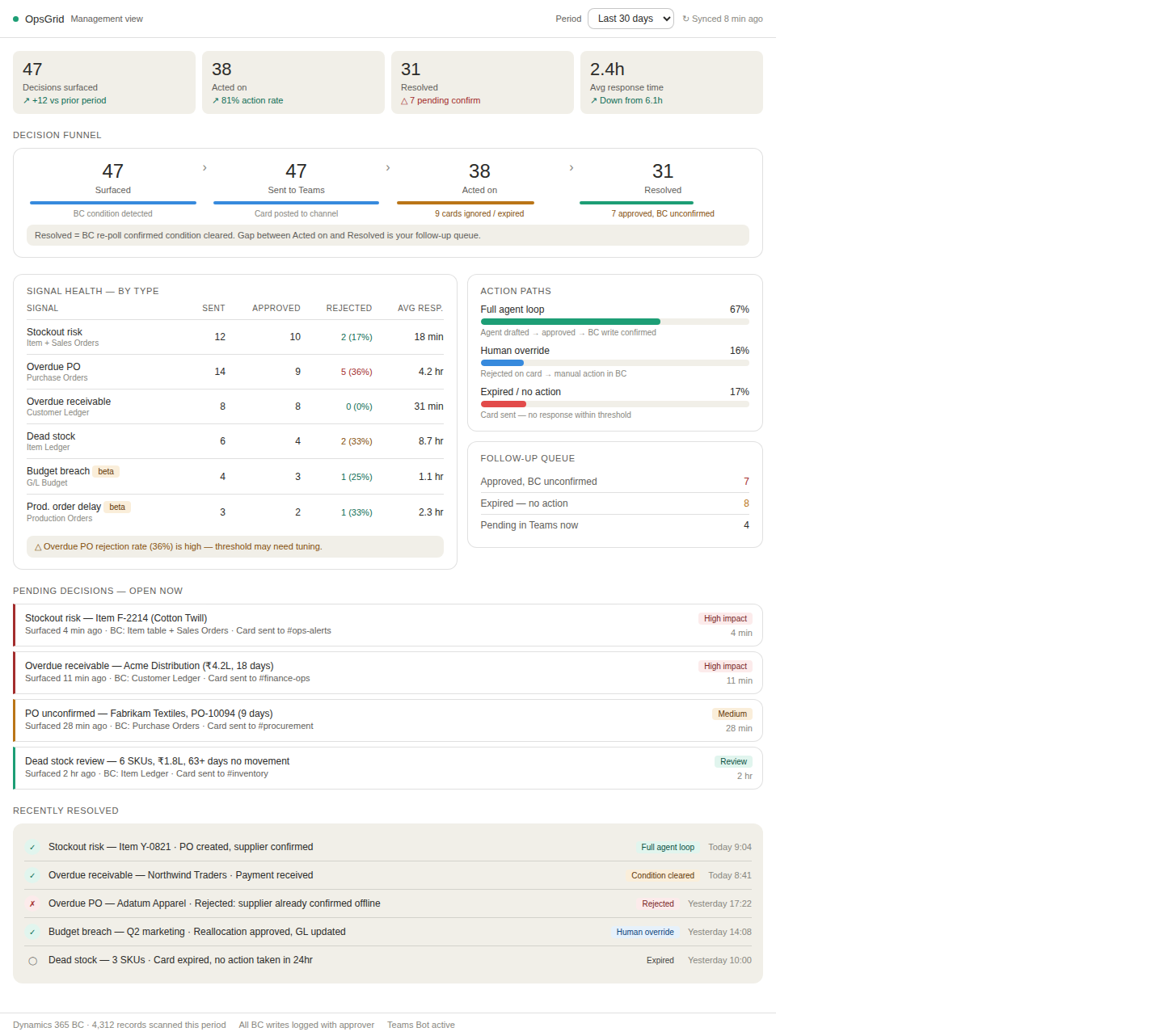
OpsGrid Management Dashboard showing decision funnel (surfaced to acted to resolved), signal health by type with response times, and full audit trail of every approved and overridden decision
Decision funnel
Surfaced → Teams → Acted → Resolved. See where inventory signals stall — and whether it's a threshold problem or an ownership problem.
Signal health by type
Cards sent, approved, rejected, avg response time — per signal type. High rejection on a stockout signal means the threshold fires on noise. Visible and tunable.
Full audit trail
Every inventory decision logged — who decided, when, what they chose. Every BC write recorded with approver. A defensible record assembled automatically.

Actual OpsGrid Beta screenshot · Dynamics 365 Business Central · sample data

What's next
30-minute call
Book a Decision Latency Audit

30 minutes. We identify the 3–5 operational decisions currently slowing your business and estimate what each delay costs. No slides. A number and a map.

Book the call →
LinkedIn
Connect with Christopher Wakare

Christopher leads IQ's deployment work. If you'd rather start with a message, connect on LinkedIn and send a note about what you're running into.

Connect on LinkedIn ↗
85%
fewer stockout incidents per month
2 wks
from BC connection to live signals
$0
unauthorized BC writes — architectural constraint

From one active OpsGrid beta deployment · Dynamics 365 Business Central · mid-market manufacturer · baseline at project start, outcomes at 30 and 90 days.