OpsGrid · PO delay alerts · Business Central

A purchase order sits approved in Business Central. Nobody’s chasing the vendor for a delivery date.

The PO cleared approval days ago. No confirmation, no shipment notice, no update — and the person meant to follow up doesn’t know it’s their job yet.

The cost of a PO nobody’s chasing

67% of Chief Procurement Officers say speed of execution is exactly where procurement falls short of what the business needs (Forrester Consulting study commissioned by Zycus, 2026). The order sitting unconfirmed in BC is that gap, one PO at a time.

What OpsGrid surfaces

Two purchasing signals. Live from your Business Central data.

Purchase order status your team currently checks manually, PO by PO. OpsGrid pulls it from BC continuously and routes the ones stuck past SLA.

  • Stuck POs — approved in BC, not moving No confirmation, no shipment notice, no update since approval
  • Open POs by vendor — aged and unacknowledged POs older than your SLA threshold with no supplier acknowledgement
Decision owner: Procurement Lead · BC write on approval: vendor follow-up or updated PO

See all 24 decisions OpsGrid surfaces 17 live today, 7 in development — ranked by what the delay costs you
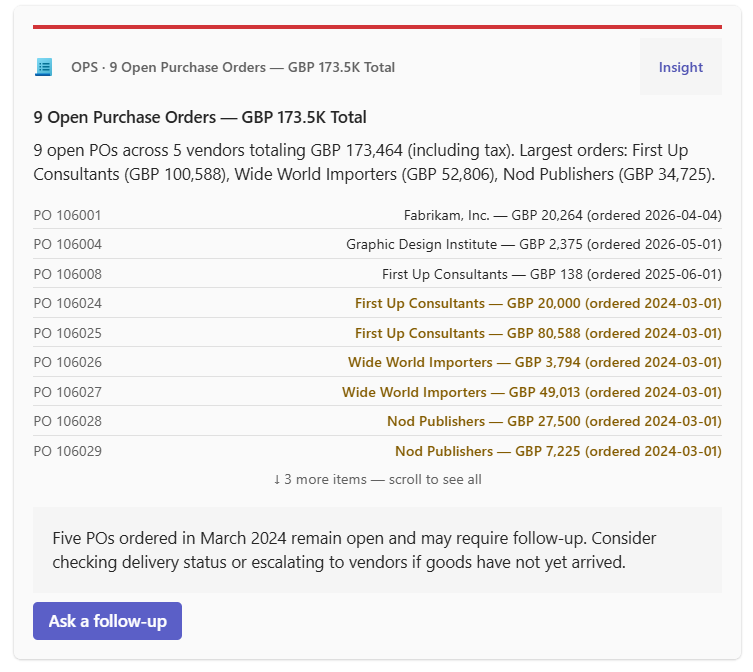
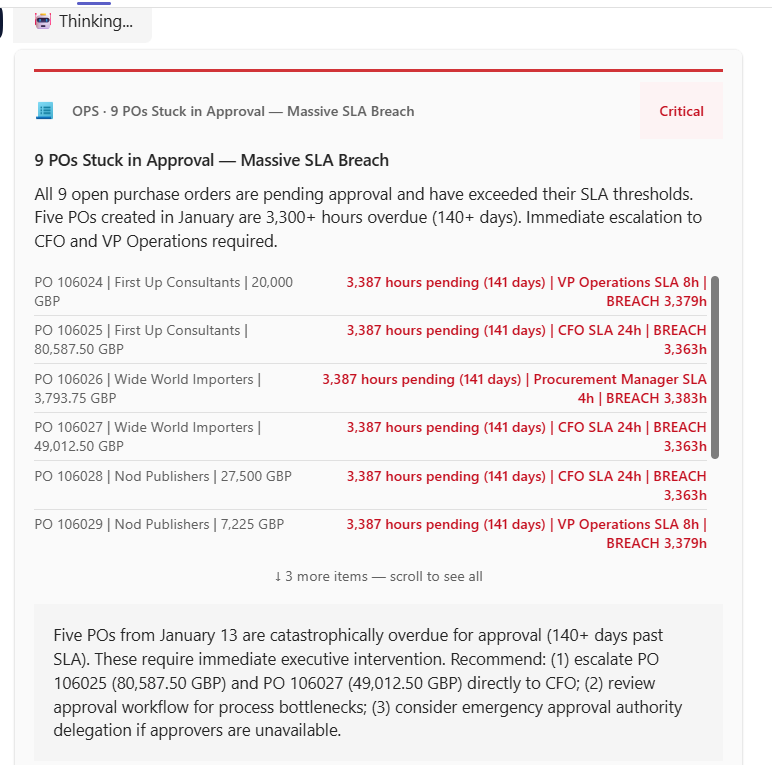
9 POs Stuck in Approval
9 POs Stuck in Approval Open Purchase Orders by Vendor

OpsGrid Beta · Dynamics 365 Business Central · sample data

How it works

Stuck POs surface in Teams. Follow-up executes in BC.

OpsGrid monitors your Business Central purchasing data continuously. Every open PO tracked against a configurable SLA threshold.
When a PO passes that threshold with no acknowledgement, a ranked card fires in Microsoft Teams to the named Procurement Lead. Days overdue and production dependency shown.
Approve the follow-up in Teams. OpsGrid logs the vendor contact and updates BC. Every decision recorded to an audit trail.
Decision Infrastructure

The PO has an owner on paper. Not a decision owner.

OpsGrid routes stuck-PO signals to a named owner in Teams, captures their approval on the next action, and executes it in Business Central — with a full audit trail.

Someone approved the PO. That’s not the same as someone approving the next move when it stalls — a follow-up call, an escalation, a reorder — within a stated window. That’s Approve, and it’s the layer that’s missing here.
Act from Microsoft Teams Predefined ownership — no ambiguity $0 unauthorized BC writes Full audit trail, automatic
60×
faster decisions — 2.3 days to 1.2 hours
2 wks
from BC connection to live decision routing
$0
unauthorized BC writes — baked into the architecture

From one active OpsGrid beta deployment · Dynamics 365 Business Central · mid-market manufacturer · baseline at project start, outcomes at 30 and 90 days.

What's next
30-minute call
Book a Decision Latency Audit

30 minutes. We identify the 3–5 operational decisions currently slowing your business and estimate what each delay costs. No slides. A number and a map.

Book the call →
LinkedIn
Connect with Christopher Wakare

Christopher leads IQ's deployment work. If you'd rather start with a message, connect on LinkedIn and send a note about what you're running into.

Connect on LinkedIn ↗